Home
Clock, next meeting with a Join button, weather at a glance, and a launcher: fuzzy app search, Google / DuckDuckGo / Perplexity / YouTube / GitHub, bare URLs, saved links.
For MacBooks with a notch · macOS 14+
Hover the camera housing and a black card grows out of it: now playing, a file shelf, clipboard history, Claude usage, weather, ambient sound, Pomodoro, live system stats — sixteen tools, one gesture.
One-time purchase. No account, no subscription, no telemetry.
Idle, Eclipse is exactly the size of the housing — invisible, covering nothing. Open, it's a 700-point card with a tab for each tool.
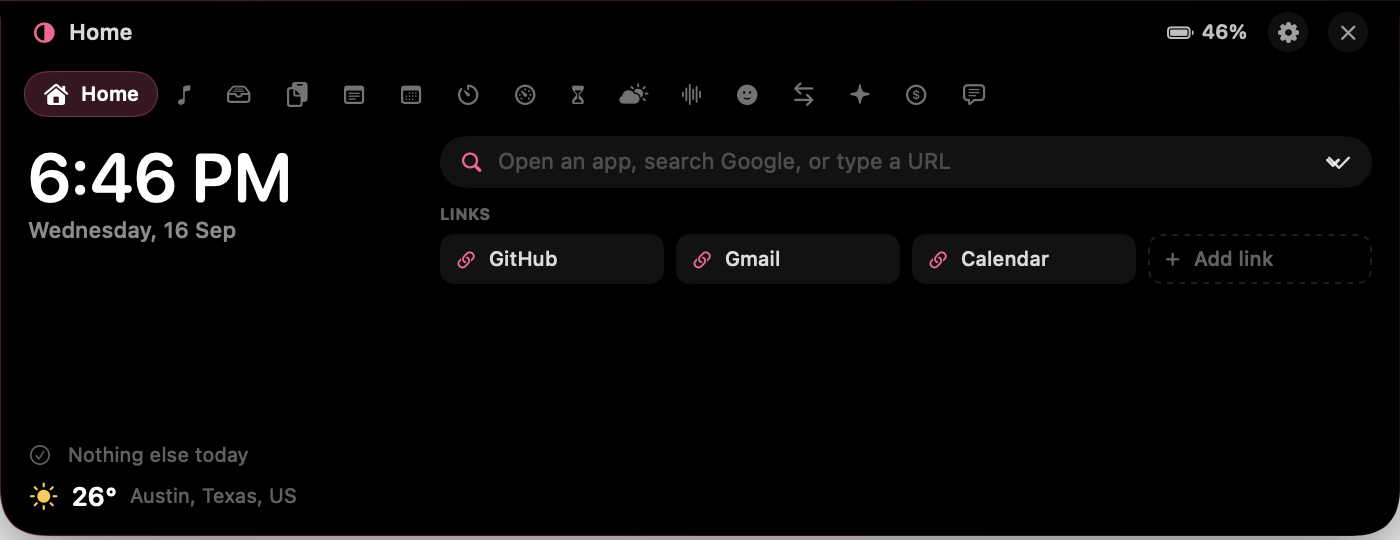
Clock, next meeting with a Join button, weather at a glance, and a launcher: fuzzy app search, Google / DuckDuckGo / Perplexity / YouTube / GitHub, bare URLs, saved links.
Artwork, scrub-to-seek, transport, output volume. Music and Spotify. The whole notch tints itself to the album.
Drop files on the notch. They're copied in, so the originals can move. Drag them back out anywhere, or AirDrop the lot.
Searchable history with text, link, color and image detection — real swatches for hex codes — pinning and source-app attribution. Password-manager entries are never stored.
Reads your local Claude Code transcripts: tokens today by type, messages, tool calls, per-project totals, streak, and a 12-week heatmap. Nothing leaves the Mac.
Countdown presets, Pomodoro that auto-advances focus and break, a lap stopwatch, hydration reminders. The running timer peeks out beside the housing.
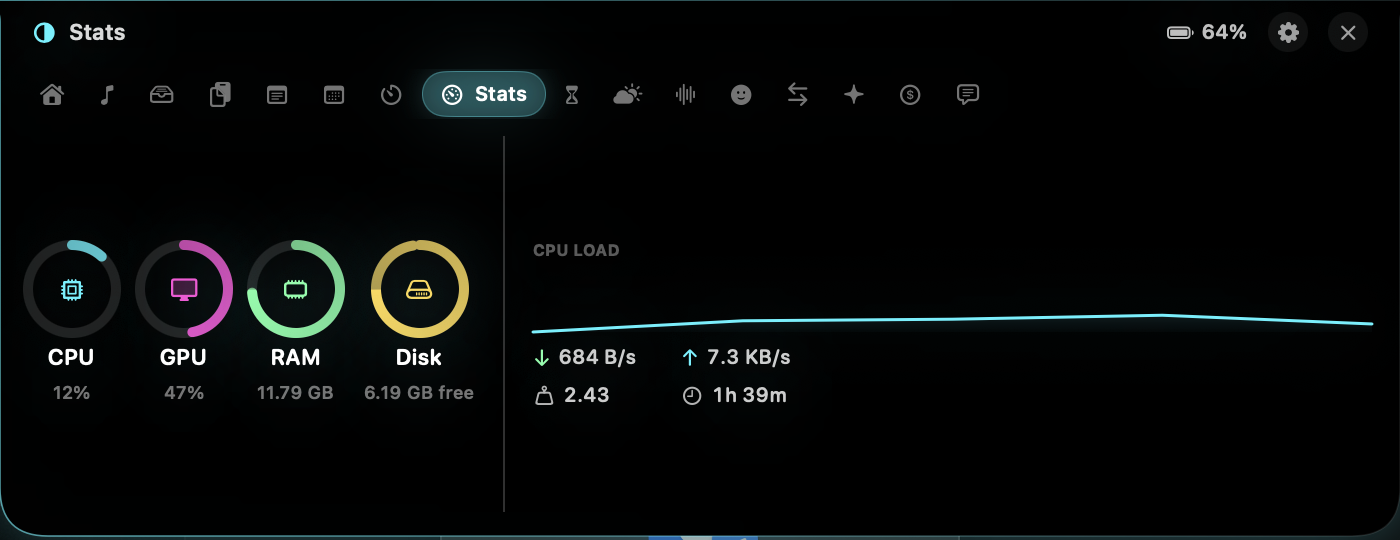
Real CPU per core, GPU utilisation, memory, disk, network throughput, load and uptime. Samples only while you're looking.
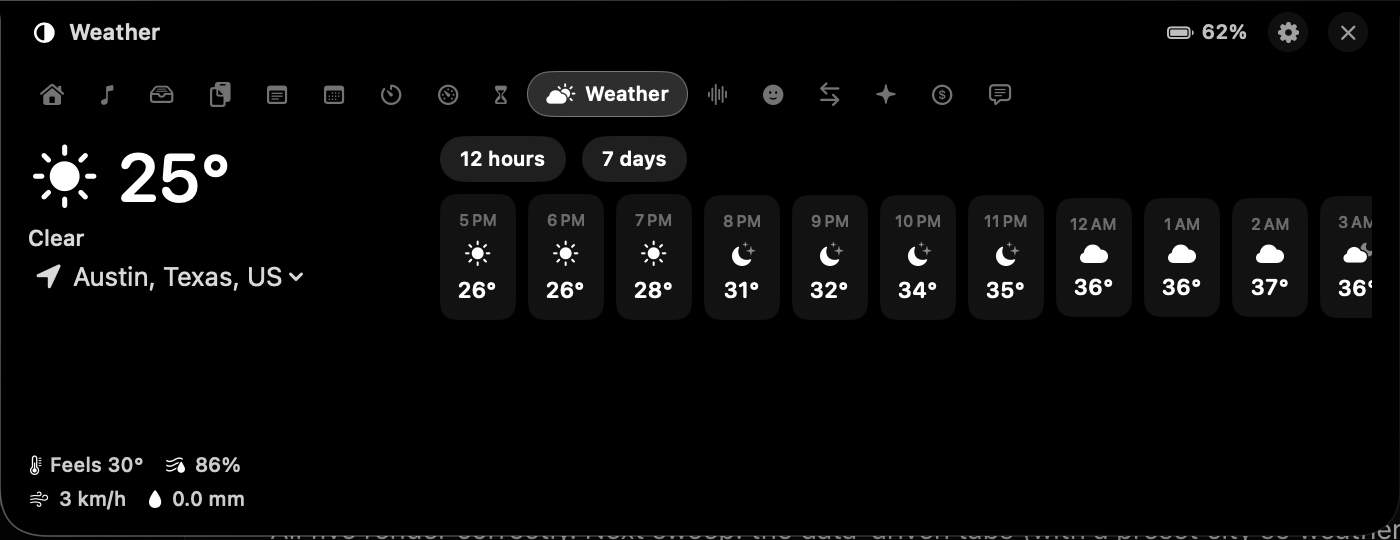
Current conditions, feels-like, humidity, wind, precipitation, a 12-hour strip and 7-day range bars. Your location or any city. No API key.
Rain, waves, wind, fireplace, fan, night forest, drone, brown noise — synthesised live, layerable, each with its own volume. No files, nothing ever loops.
A pinned scratchpad that's always there, plus a notes list. Saves as you type.
Today and tomorrow, with meeting links pulled out of notes and locations for one-click Join.
Where the day went, per app, with a 7-day chart. Local only; pauses when you walk away.
A dot-matrix ticker across the collapsed notch. Text is rasterised through a real typeface, so any script or emoji works. Six animation styles.
Stripe, Polar and Dodo Payments with read-only keys kept in your Keychain. Today, 7 days, 30 days, and a banner when a sale lands.
A searchable emoji picker with recents, and unit conversion across eight categories.
Volume, brightness, power, low battery, track changes and new sales appear as a pill around the housing — Dynamic Island, on a Mac.
Adaptive picks the accent from whatever's playing. Minimal is black and white so nothing competes with your work. Playful gives every tool its own hue. Neon glows.
Pin a metric beside the housing while it's closed — clock, battery, CPU, today's revenue, or the ticker.


One-time purchase
Every tool, every theme, every update. Yours.
Secure checkout by Dodo Payments. Download link and license arrive instantly.
Yes. Eclipse draws a synthetic housing at the top of the screen and everything works the same way.
No. While idle the window is exactly the size of the camera housing — dead space you couldn't click anyway. While music plays it widens by 40 points each side so artwork can peek out; a click there opens Eclipse.
Weather requests to Open-Meteo, and revenue requests to whichever payment provider you connect. That's the complete list. Clipboard, notes, screen time, shelf files and Claude usage never leave the machine.
macOS 14 Sonoma or later, Apple silicon or Intel.
Every tool has a switch. Disabled tools disappear from the tab strip.